Introduction to Durable Execution with Temporal
Durable execution promises reliable, fault-tolerant execution. Temporal is the reference implementation, illustrated with a real-world prototype.
Writing a program that manages an interruptible process is far harder than it looks. As soon as a workflow runs for more than a few seconds — waiting for an external response, nudging a user, or requiring human approval — the code fills up with defensive logic: timeout handling, error recovery, state persistence, exponential edge cases, idempotency management… That’s where bugs accumulate and accidental complexity takes over.
That’s exactly the problem durable execution is designed to solve.
Durable execution: fault-tolerant program execution
Durable execution is an execution model that guarantees a program survives failures: server restarts, network timeouts, third-party service outages. Program state is automatically persisted, and execution resumes exactly where it left off — without the developer having to manage any of that explicitly.
Concretely, this delivers three things:
- Reliability: the process is fault-tolerant without any additional defensive code
- Simplicity: the code expresses what the process should do, not what might go wrong
- Velocity: large swaths of error-handling and state-persistence logic simply disappear
Temporal: the reference implementation
This concept brings back memories of my experience with BPM-style solutions from the late 2000s. The idea was appealing on paper: visually model processes, orchestrate human and automated tasks, manage state, and so on. But the tools of that era were bloated (to put it mildly), hard to operationalize, and far removed from an as-code philosophy.
Over the years, I kept sensing that a BPM-style solution could address real business problems for my clients. I stayed on top of tools like Activiti (s'ouvre dans un nouvel onglet), but never found the right context to deploy them at scale.
Temporal (s'ouvre dans un nouvel onglet) feels like a return to those promises — but with a radically different approach: workflows are written in the language of your choice (Go, TypeScript, Java, Python…), run like ordinary code, and transparently benefit from all the guarantees of durable execution. No BPMN XML to define, no mandatory graphical designer — just versioned, testable code.
Temporal architecture overview
At a high level, Temporal’s architecture is split into two parts: the Temporal cluster and the user-side applications.
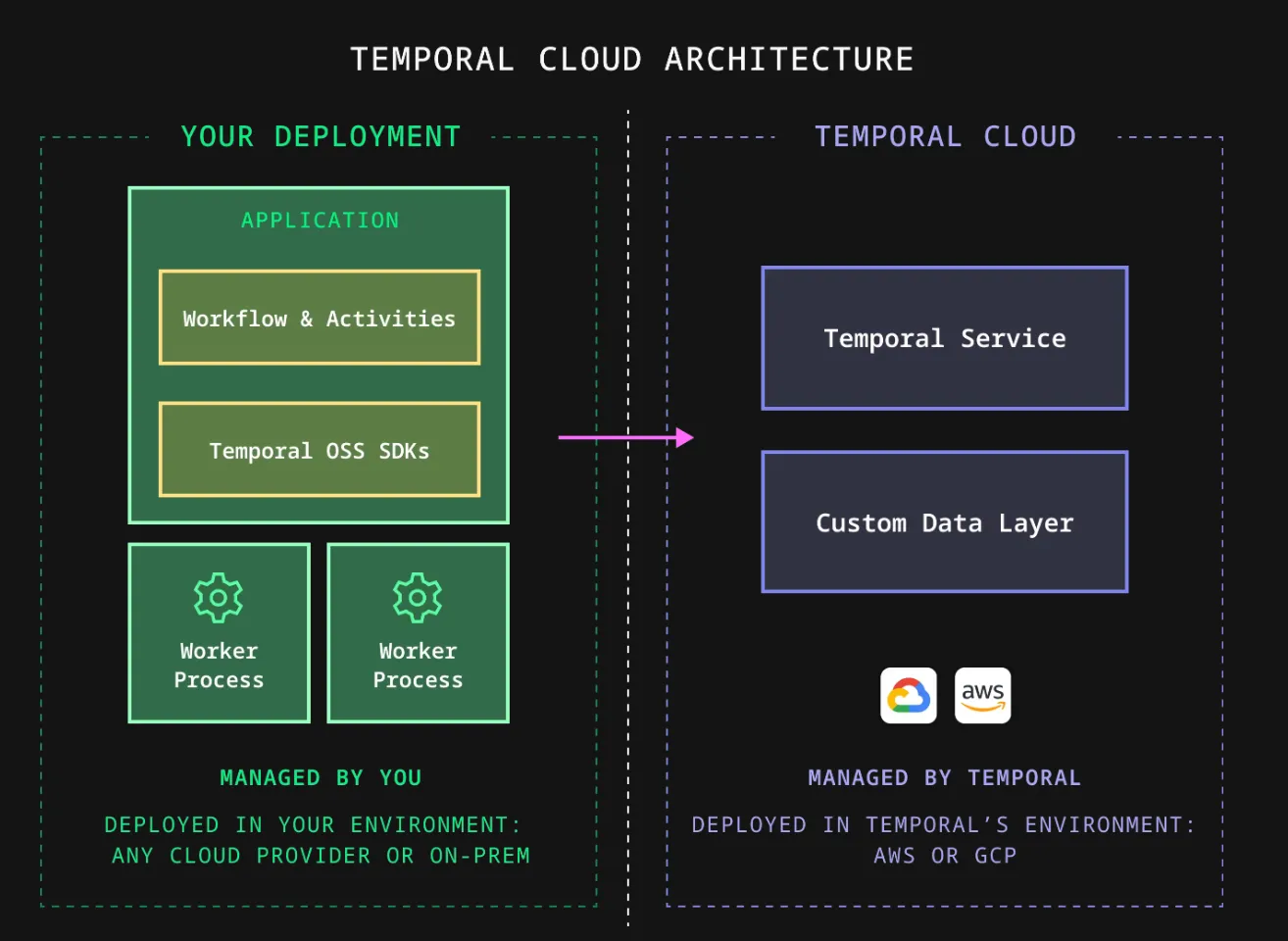
The Temporal cluster can be deployed on-premise, in your cloud environment, or via the Temporal Cloud offering. It handles persisting workflow state and dispatching work to the various workers.
On the user side, workers execute your workflows and activities under the direction of the Temporal cluster. To start a workflow or query a running one, your application uses the Temporal SDK, which communicates with the cluster over gRPC.
Developing a workflow
Temporal SDKs make it straightforward to implement complex workflows with a good developer experience.
A Temporal workflow orchestrates activities. An activity is a plain function that performs an action (short- or long-running), typically involving interaction with the outside world — sending emails, making network requests, writing to a database, or calling an API. These operations can fail. When an activity fails, Temporal automatically retries it, letting you focus entirely on business logic. Here’s an example activity in TypeScript:
export async function greet(name: string): Promise<string> { return `Hello, ${name}!`;}Temporal workflows are resilient: they can run for years, even in the face of underlying infrastructure failures. For example, if the application server crashes while a workflow is running, Temporal automatically restarts the workflow by restoring the state prior to the failure, allowing execution to resume without data loss. Below is a minimal workflow that calls the activity defined above:
import { proxyActivities } from '@temporalio/workflow';// Only import the activity typesimport type * as activities from './activities';
const { greet } = proxyActivities<typeof activities>({  startToCloseTimeout: '1 minute',});
/** A workflow that simply calls an activity */export async function example(name: string): Promise<string> {  return await greet(name);}
The Temporal SDK lets applications interact with workflows through two fundamental mechanisms:
- Signals: send an event to a running workflow — e.g., request a status change or a validation.
- Queries: read the current state of a running workflow without interrupting it — e.g., retrieve a variable computed inside the workflow.
Signals are handled inside the workflow by handlers that can mutate internal state. The example below includes a handler for an approval signal. The workflow waits indefinitely until the signal is received (this logic can be enriched with timeout handling as needed):
import * as wf from '@temporalio/workflow';
// 👉 Use the object returned by defineSignal to set the Signal handler in// Workflow code, and to send the Signal from Client code.export const approve = wf.defineSignal<[ApproveInput]>('approve');
export async function greetingWorkflow(): Promise<string> {  let approvedForRelease = false;  let approverName: string | undefined;
  wf.setHandler(approve, (input) => {    // 👉 A Signal handler mutates the Workflow state but cannot return a value.    approvedForRelease = true;    approverName = input.name;  });
  // Wait indefinitely for the approval signal  await condition(() => approvedForRelease);}
Use case: a loan application
To explore Temporal hands-on, I built a loan application prototype (s'ouvre dans un nouvel onglet) in TypeScript. The scenario is deliberately simple, but it illustrates the tool’s capabilities well: it’s a potentially long-running process that combines automated steps with human approval.
The minimal business process follows these steps:
- Application submission: the applicant submits their request with personal details, the project to be financed, and supporting documents
- Document verification: the system checks whether the file is complete; if documents are missing, it follows up with the applicant by email every 24 hours for a week
- Fraud analysis: once the file is complete, a third-party service assesses the risk
- Validation: low-amount applications are approved automatically; above a threshold, human review is required
This kind of process feels like a natural fit for a durable execution design: several days can pass between submission and final decision, with asynchronous interactions at every step and multiple sources of both technical and business errors.
Prototype architecture
The prototype runs on a Temporal server started in development mode using a docker-compose configuration.
A REST API built with Fastify (s'ouvre dans un nouvel onglet) handles creating funding requests. Each request starts a workflow using the Temporal TypeScript SDK (s'ouvre dans un nouvel onglet). The API interacts with running workflows via signals and queries.
The API also allows uploading missing documents, listing pending validation requests, and approving or rejecting an application.
The Temporal admin console provides full visibility into workflow execution: event history, current state, duration, and any errors. It’s a significant asset for debugging and operational monitoring.
Walkthrough
Let’s walk through the prototype, starting by cloning the GitHub repository (s'ouvre dans un nouvel onglet).
git clone https://github.com/smonfort/temporal-funding-demo.gitStart the Temporal cluster in the background. Persistence is handled via a local volume.
docker-compose up -dThen start the loan application service.
pnpm installpnpm startNow that the application is running, let’s try a simple happy-path example first: a complete funding request where the fraud check returns no errors and the amount is below the human review threshold. Per our design, the request is approved automatically. Let’s submit it to the API.
curl -s -X POST http://localhost:3000/funding-requests \ -H "Content-Type: application/json" \ -d '{ "userId": "user-001", "userEmail": "alice@example.com", "amount": 250, "purpose": "Purchase of computer equipment", "documents": ["identity", "income_proof", "bank_statement"] }'The API returns a 200 response with the ID of the created workflow.
{ "id": "76b85a27-51c8-4738-9ec0-3088b8e46041", "status": "INITIATED", "message": "Request created and workflow started."}The Temporal admin console is available at: http://localhost:8233/ (s'ouvre dans un nouvel onglet)
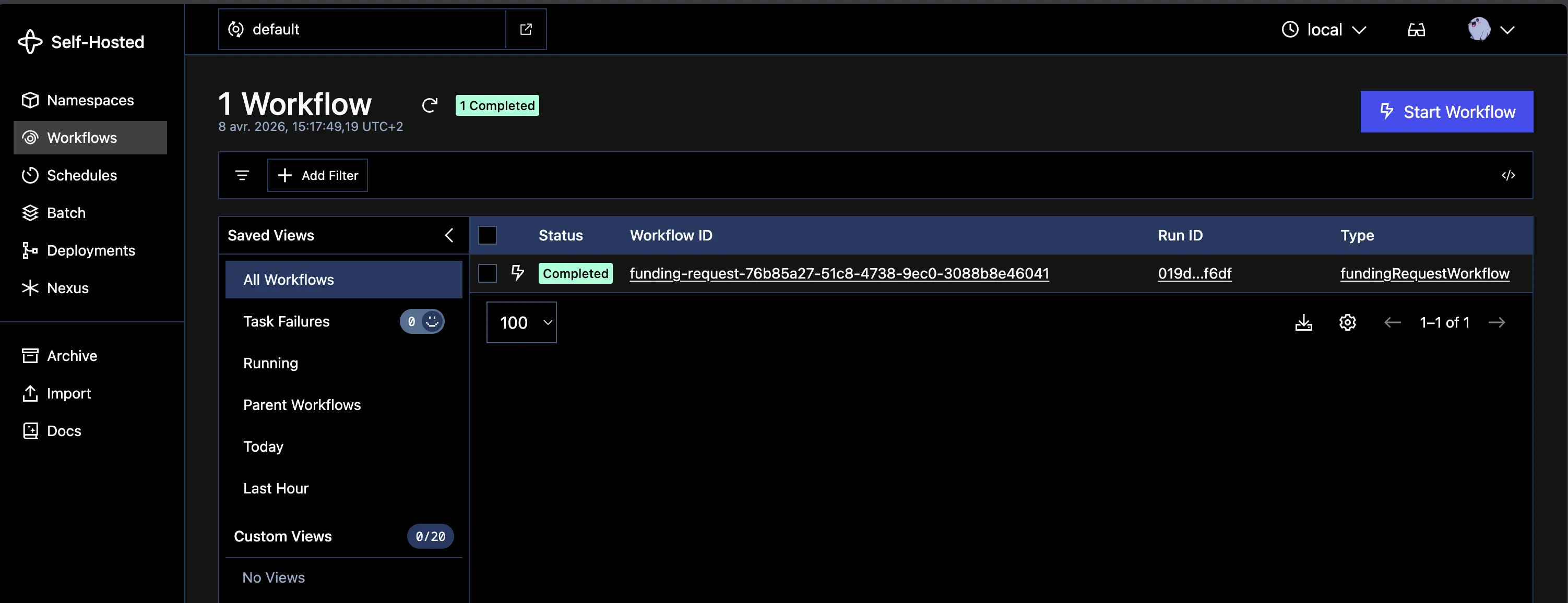
The Workflows section shows this workflow with a Completed status.
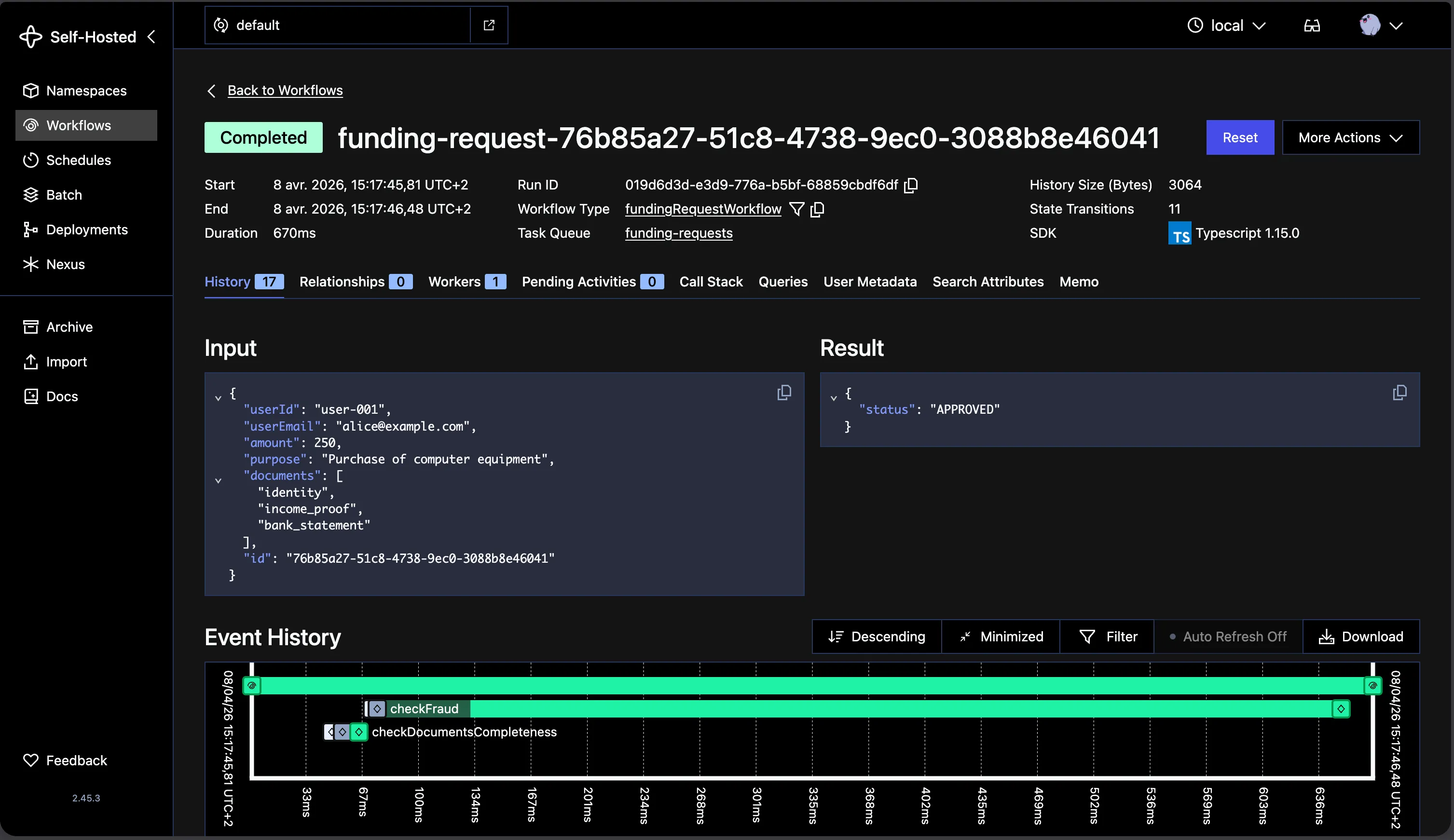
The workflow detail view shows each activity in a chronological timeline, with input and output data for each one. Notice the checkFraud activity, where a stub simulates a slight delay — which explains the time spent there.
Now let’s try a second example. A funding request is submitted with incomplete documentation. The applicant is followed up with until all required documents are provided.
Let’s submit a new incomplete request (missing a valid identity document).
curl -s -X POST http://localhost:3000/funding-requests \ -H "Content-Type: application/json" \ -d '{ "userId": "user-002", "userEmail": "bob@example.com", "amount": 300, "purpose": "Vacations", "documents": ["income_proof", "bank_statement"] }'The console shows a new workflow with a Running status.
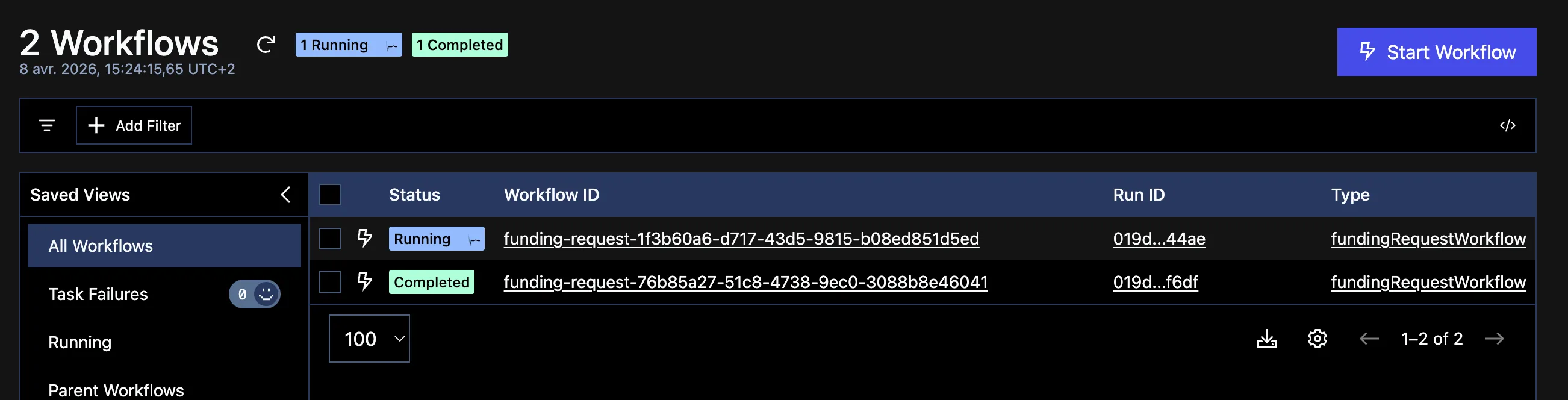
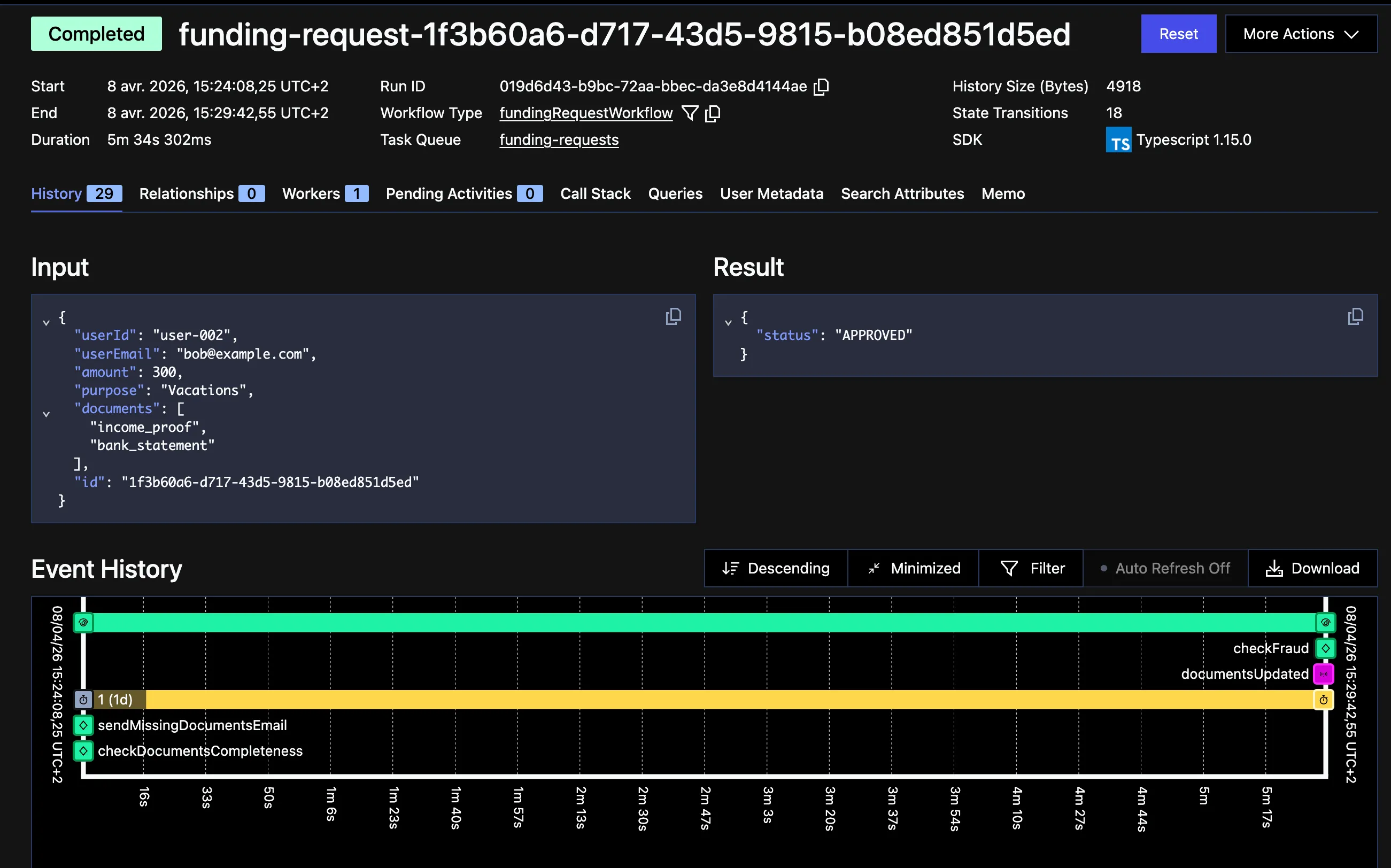
The workflow detail shows that an activity was executed to send an email to the applicant, and a timer was started. After 24 hours with no response, a new email will be sent.
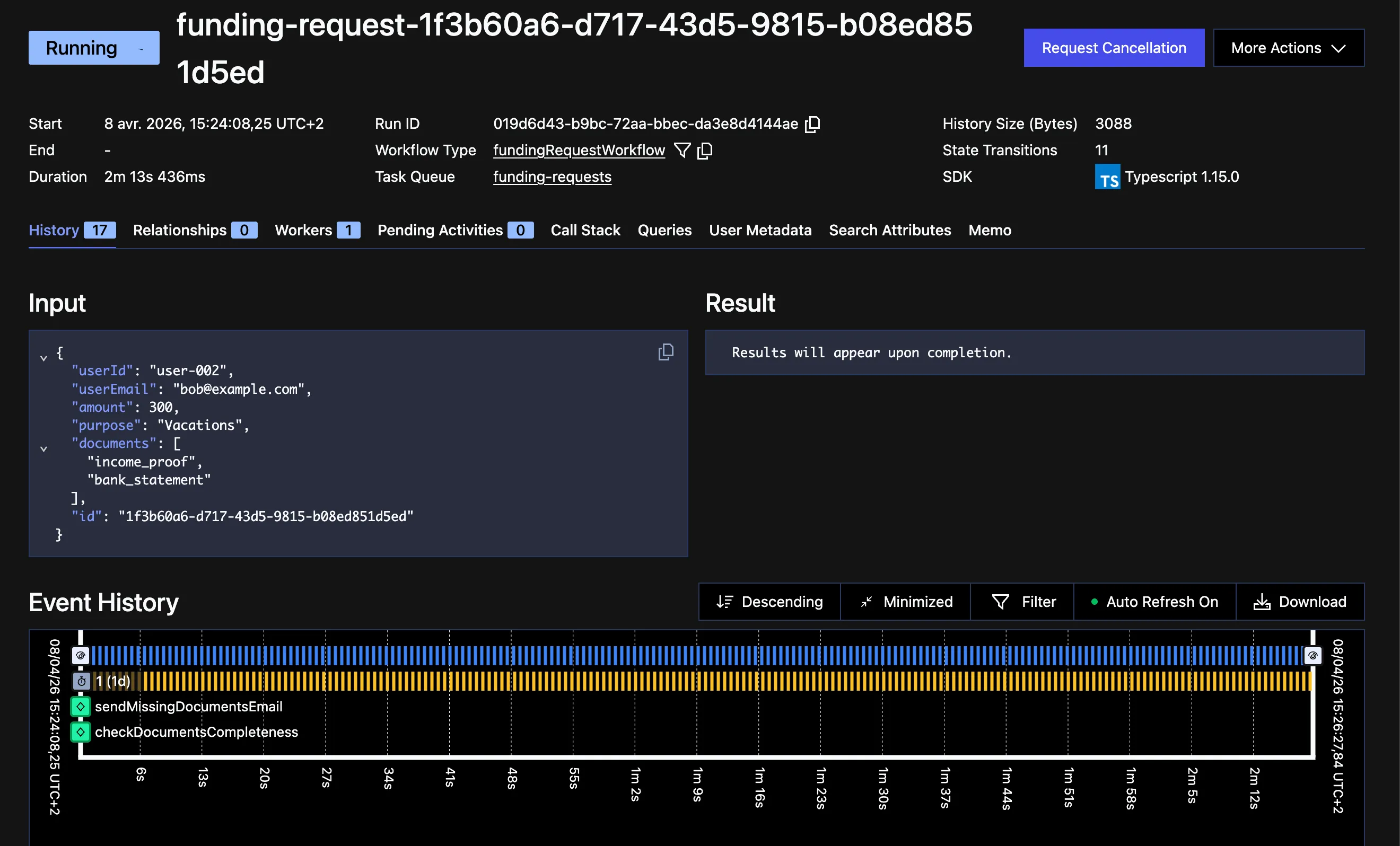
The applicant responds before those 24 hours are up and submits the missing document — an action we can simulate with this API call.
curl -s -X POST "http://localhost:3000/funding-requests/1f3b60a6-d717-43d5-9815-b08ed851d5ed/documents" \ -H "Content-Type: application/json" \ -d '{ "documents": ["identity", "income_proof", "bank_statement"] }'The API sends a signal to the workflow, which resumes execution: the documents are now complete, the fraud check passes, and the request is automatically closed.
Conclusion
We’ve only scratched the surface of what Temporal can do. For me, it stands out as the most elegant and modern solution I’ve tried for orchestrating durable, reliable business processes. The workflow-as-code approach is a significant improvement over traditional BPM tools: the code is readable, testable, and versioned alongside the rest of the project. Give it a try!